📱 Phone apps — install-free web apps
Open the link on your phone and tap “Add to Home Screen”. They work offline and keep everything on your phone. Free to try, right now.
Attendance Gather
Lecturers tap only the students who are absent; the department office sees it all on one sheet.
More details
Nothing to install — a lecturer opens one link, on an iPhone or an Android, and the class list appears with everyone marked present by default. Tap the absentees, press send, done. If the signal drops, the phone keeps the marks and sends them by itself later. The office screen shows today's classes, who has not sent yet, and how many times each student has been absent. The data lives in your own school's Google account — it never reaches VALUES, and there is no monthly fee. This does not replace your LMS; it is the running record a department keeps for itself during the term. (Korean interface.)
Approval Required!
A small paperwork game. Official documents land on your desk one at a time; stamp them or send them back. Is the attachment missing? Is the date backwards? Is the approval line wrong? Each day adds one more thing to check. Nothing to install, nothing to sign up for. (Korean text — a fun way to read real office Korean.)
100% free · no ads, ever Play Approval Required!Site Photo Report
Photograph the site, add a caption, and get the report as a file — on the phone itself.
More details
Pick 1, 2, 4 or 6 photos per page and drag them into the order you want — the two things paying customers of the leading app have been asking for since 2024. Photos are shrunk on the phone, never uploaded: nothing leaves the device, and the app collects nothing at all. Comes out as PDF, and — the part no other app does — as a Hancom (.hwpx) document, which is what Korean sites are asked for. No ads, no subscription, no account.
Memo Cards
Flash cards without the setup maze. Paste “front : back” lines, and it shows you only what's due today — spaced repetition hidden inside three friendly buttons.
Free trial (20 cards) · unlock with a license key Open Memo CardsHome Meter
Photograph your water, electricity or gas meter and it reads the number and keeps a monthly record — then tells you, in plain words, how much more or less you used than last month. Not one line of anybody else's advertising. No account, no subscription, and nothing leaves the phone. Korean and English.
100% free · no ads, ever Get Home MeterPill Pouch Timetable
Photograph the pharmacy pouch; it reads “times a day · how many days”, builds a timetable and the phone reminds you when it is time. It never says what a medicine does or how much to take — only when. No internet permission at all. Korean and English.
100% free · no ads, ever Get Pill Pouch TimetableWhat Letter Is This?
Photograph the Korean paper that came in the post. It tells you what kind of letter it is, by when, how much and what you have to do — and opens the number to call, in a language that answers (1345 takes 20 languages). The text reader is built in, so it works with no internet at all and on phones with no Google Play. The photo is sent nowhere. Korean and English.
100% free · no ads, ever Get What Letter Is This?Can I Eat This?
Photograph the back of a Korean food packet. It tells you only whether something you cannot eat is in it — "it is in there", "it may have got in", or "only seen in the ingredients" — and shows you the line exactly as printed. No scores. It leans on no database, so there is no such thing as an "unknown product". Works with no internet. Korean and English.
100% free · no ads, ever Get Can I Eat This?Parent Care Log
Brothers and sisters write down hospital trips, visits and what they paid for a parent's care — and it tells you who should send whom how much to make it even. No account, no server. Korean and English.
100% free · no ads, ever Get Parent Care LogReceipt Wallet
Photograph a receipt and it pulls out the date, the shop and the amount and stacks them in a table, totalling each month. Export it as a spreadsheet for your accounting software. Reading happens on the phone; the photo is sent nowhere. First build — if it reads a receipt badly it says so rather than inventing a number.
100% free · no ads, ever Get Receipt WalletSend Safely — Photos
Finds the resident registration number, bank account, card number, phone number, name and address inside a photo and covers them over — then reads the picture again to check nothing survived, and strips the location the camera attached. All on the phone. (For files on a computer, see Send Safely — Files above.)
100% free · no ads, ever Get Send Safely — PhotosCounter Talk
Everyday counter Korean, ready to tap — enrolling, paying, papers, directions. Every phrase shows in both languages; one button swaps which one is big, so either side can hold the phone. 36 languages, works with no internet, nothing leaves your phone.
100% free · no ads, ever Open Counter TalkKorean Proverb a Day
One Korean proverb every day — fill in the blank, get gentle hints, and read the meaning in English. A tiny daily Korean lesson, completely free.
100% free · no ads, ever Play today's proverbMind Drawer
Copy one good sentence a day, slowly, by hand. Keeps your streak and your own one-line thoughts. (Passages are in Korean — lovely for Korean learners.)
Free trial (7 sentences) Open Mind DrawerVanity Notebook
Write down when you open a cosmetic; it warns you in color as the use-by period runs out. Sorted by soonest-to-expire, stored only on your phone.
Free trial (5 items) Open Vanity NotebookKorean Crossword
Every puzzle is generated and checked by the machine, so the board never runs out. No ads, no internet, nothing collected. (Clues and answers are in Korean.)
100% free · no ads, ever Get Korean CrosswordIngredient Reader
Paste the ingredient list from the back of a cosmetic and read it by evidence instead of a grade. Works offline and stores nothing. (Korean interface.)
100% free · no ads, ever Get Ingredient ReaderTile Survive
One round, five minutes. Flip tiles for food, timber, power and scrap, and see how many days you last. Nothing to install, nothing to sign up for.
100% free · no ads, ever Play Tile Survive🧰 Windows tools
Installable Windows programs. English/Korean switch in every window, and results flow into one shared “Workbox” folder so the tools work together. Card checkout below works with international cards, powered by Paddle.
🔵 If a blue window appears during install — nothing is broken
When you double-click the file you downloaded, Windows may stop you once with a blue window saying “Windows protected your PC” (some versions say “Windows has protected your PC”). It does not mean there is anything wrong with the program.
The text is small — it sits in the middle of the window.
Why does it happen?
Think of a shop that just opened on your street. Not a bad shop — simply one
not many people have walked into yet, so Windows says “I don't know this place yet”.
Big companies pay every year for a signing certificate that tells Windows “this shop is fine”.
We put that money into making the tools instead. As more people download, the warning fades away on its own.
If you want to be sure the file really came from VALUES
Write to ranger7903@nate.com
and I will tell you the exact file size. Right-click the file you downloaded → Properties shows its size,
so you can compare the two numbers. I answer personally.
※ Your antivirus may scan the file first, so the install can feel slow. Just let it finish.
※ VALUES programs send nothing over the internet. Your files stay on your computer.
📄 Documents & paperworkHangul, Word, PDF and Excel, all day long
Korean Form Gatherer
Dozens of filled-in Korean (HWP) forms → one Excel sheet.
More details
Drop in the folder and it works out by itself what to collect — cells inside tables and values written in running text alike (“Reason: …”). Preview the fields, pick the ones you want, rename the Excel headers. Files with a different shape or an empty cell are listed separately instead of being silently wrong. Reads old .hwp, new .hwpx and .docx. No internet; originals are only read.
Redact for Files
Masks Korean ID numbers inside Excel, Word and HWPX files — on your own computer.
More details
Hancom's own finder only masks HWP files; it finds but does not mask Excel or Word. Business products make you phone for a price. This one takes a file or a whole folder and one button. Your originals are never changed — a new “name(masked).ext” file comes out beside them. Tables, fonts, conditional formatting, data validation and frozen panes all survive, because the file is edited in place rather than opened and re-saved, and the character count does not change (880101-1******), so column widths and line breaks do not shift. After masking it reads the file again by itself and tells you if anything is still there. It only masks when the checksum matches, so student numbers, amounts and dates are not mistaken for ID numbers. Korean resident and foreigner registration numbers, business numbers, bank, card, phone, email and passport — whichever you tick. Old .hwp is not supported; save as .hwpx. No internet, ever.
Official Letter Checker
Catches the small mistakes in an official letter before it goes up for approval.
More details
Not a spell checker — it looks at the things a word processor never checks: empty recipient or subject cells, a missing closing mark, attachment numbers that skip (1, 3), unfilled blanks like “( )”, mixed date formats, and whether “N people” in the body matches the rows of the attached list. Every check can be switched off, because every institution's rules differ. Files that are not official letters are skipped in silence. Reads .hwp, .hwpx and .docx.
Table Grabber
Pulls the tables out of your PDFs into one Excel file — on your own computer.
More details
Every easy tool for this uploads your file to somebody's server and charges per page (about $39 a month); the free ones need Python (Camelot) or a template per layout (Tabula). Drop in a whole folder, see a preview of every table found, tick the ones you want, and get them as one sheet per table, all in one sheet, or one sheet per PDF — each marked with the PDF and page it came from. Your originals are only read, never changed, and nothing leaves your machine. A scanned (photo) PDF has no text, so no table can be pulled out: it tells you that plainly instead of handing you an empty sheet.
Smart Data Merger
Point it at a folder and every table inside — Excel, CSV, Word, PDF, Hangul — is merged into one tidy spreadsheet. Column names are matched automatically.
₩24,900 ≈ $18.9 Buy nowSmart Form Filler
One list + one template = a filled document for every person. 120 certificates in one click, with {{name}}-style blanks in Word, Excel or Hangul.
₩24,900 ≈ $18.9 Buy nowSmart List Compare
Feed it two lists and it reports who's missing, who's new, and whose details changed — as one clear Excel file. Ignores spacing, case and format noise.
₩29,900 ≈ $22.9 Buy nowPDF Mending Kit
Merge, split, rotate, stamp, page numbers, images→PDF. The six little fixes your PDFs actually need — offline, originals never touched.
Free Download free🏪 Shop & businessTake bookings, make the paperwork, type faster
VALUES Counter
Quotes, statements and receipts as tidy PDFs in three steps, with an automatic ledger and a daily sales book (card/cash/transfer). Made for one-person businesses.
₩12,900 ≈ $9.9 Buy nowBooking Notebook
Take bookings and get warned the moment two overlap.
More details
Split chairs, rooms or staff so several people can be booked at once; find free times instantly; repeat a weekly class in one go; and prepare tomorrow's reminder texts in a single copy. Customer cards show visits, no-shows and who hasn't been in for a while. Everything stays on your computer — you send the texts yourself.
Quick Typer
Type a short abbreviation, get your whole sentence — greetings, addresses, sign-offs. Works in any app, with date and cursor variables.
₩19,900 ≈ $14.9 Buy now🔒 Keeping personal data inOne last check before a file leaves your desk
Send Safely — Files
Masks Korean resident numbers, alien registration numbers, bank accounts, card numbers, phones, e-mails and passport numbers inside
More details
Excel, Word and Hangul files. Your original file is never touched — the masked copy is a new file, and tables, fonts, conditional formatting, data validation and frozen panes all survive because the file is never opened and re-saved. Character counts stay the same (880101-1******), so column widths and line breaks do not shift. After masking it reads the file back itself and tells you if anything is left. Nothing leaves your computer.
🌿 A lighter daySmall things between the work
Desk Garden
A focus timer that never punishes. Work with the timer on and your garden grows — one flower per 25 minutes, plus an automatic work diary.
₩4,900 ≈ $3.9 Buy nowHeart Drawer (PC)
The desktop twin of Mind Drawer — one sentence a day, typed slowly, kept forever. One license opens both PC and phone.
₩7,900 ≈ $5.9 Buy now🎁 Free, no stringsTry them; come back if you like how they feel
Capture Crayons
Snap the screen, mosaic private bits in 3 seconds, add arrows, boxes, step numbers ①②③ — and record short GIFs. Explanations become one picture.
Free Download freeFolder Keeper
Tidies your messy Downloads folder by your rules — documents here, photos by month. Never overwrites, never deletes, one-click undo.
Free Download freeName Tagger — free
Batch-rename files in three steps. Our free gift so you can see how VALUES tools feel.
Free Download free⭐ The bigger toolsFor those who will lean on them daily
Automation Assistant
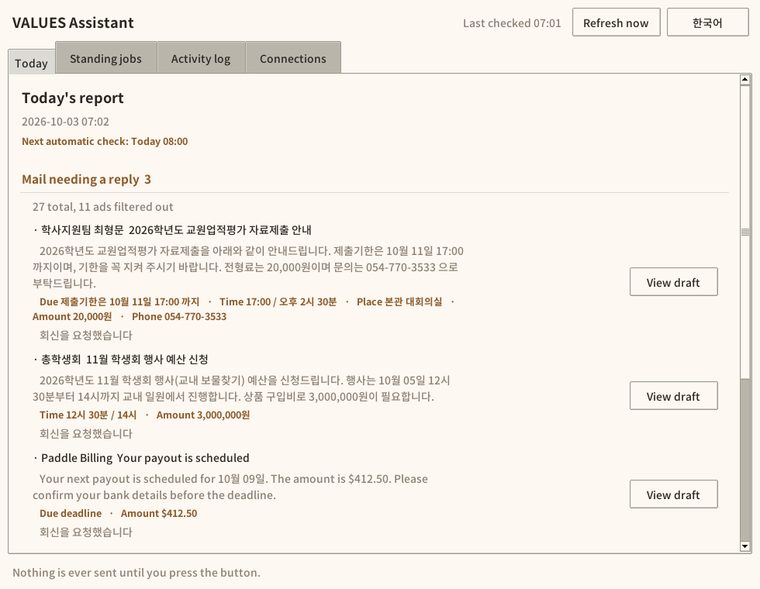
Every morning: the mail that needs an answer, and what is coming up — on one page. Your mail never leaves your computer.
More details
At the hour you choose, it reads overnight mail, strips the ads out and picks the ones asking for an answer, and shortens each to a few lines. It pulls out the deadline, time, place, amount and phone number written in the text, and merges those with your Google Calendar into one Coming up list. It writes draft replies and stops there — nothing is ever sent until you press send.
The summarising happens on your own computer — no AI service, no server, nothing uploaded. Your mail password goes into the computer's own credential lock (Windows credential lock, macOS Keychain), not into a settings file.
Please read before buying. (1) To read your mail you must create an app password yourself in Gmail, Naver Mail or Daum Mail — for Nate Mail you simply use your ordinary login password. There is no "sign in with Google" button. It takes about ten minutes; if that sounds like too much, please do not buy it. (2) It connects to Nate Mail, Naver Mail, Gmail, Daum Mail, Google Calendar and Paddle. It cannot yet connect to a company or school intranet.
Windows, macOS and Linux builds are all included, and the whole program runs in English or Korean.

Grant Settlement Checker
Puts your bank statement next to your expenditure ledger, finds every mismatch, and fills in the government reporting spreadsheet for you.
More details
Feed it the statement file exactly as the bank gave it to you and the ledger you keep in Excel. It works out which line pairs with which — including one ledger line paid out in several transfers, several ledger lines paid in one transfer, dates a few days apart, and amounts that do not agree — then shows you what is left over with no partner at all.
It checks the running balance first. Last line's balance minus money out plus money in should equal this line's balance; when it does not, your downloaded statement is missing rows, and reconciling a statement with missing rows makes innocent lines look wrong. Almost no other reconciliation tool does this check.
It does not memorise the government form. It opens the blank form you downloaded, reads its column headings and fills in underneath. When the form changes next year, it still fits.
It reports nine kinds of problem: statement-only, ledger-only, amount disagreement, outside the project period, entered twice, missing receipt, interest not returned, and spending over the granted amount. Rows worth a second look are shaded yellow, with a separate "VALUES check sheet" tab saying why — you upload only the first tab, so nothing gets in the way.
Everything is computed on your own computer. It works with the network unplugged.
Please read before buying. (0) The program's screen is in Korean only — there is no English interface yet. (1) Windows only — there is no macOS or Linux build yet. (2) It does not yet read card statement files (their columns differ from a bank statement). (3) It cannot yet split one line across several budget categories. (4) It leaves the free-form narrative tabs of the settlement report alone, because there is no fixed government template for them.

Receivables Matcher
Tells you who still has not paid — how much, and how many days late.
More details
Give it your invoice list and your bank statement. Customers never pay the way your books expect: they lump several invoices into one transfer, deduct the transfer fee, pay half now and half later, and pay under a different name. It tries all four.
Exact matches are assigned first. Filling the oldest invoice first makes an exactly-paid invoice land on an older one and read as "paid in part" — that really happened, so the order was changed.
When a deposit arrives under a name you never invoiced and exactly one unpaid invoice matches that amount, it assigns it and tells you "this name was that customer"; write the name into your invoice list and it matches automatically from then on.
You get a three-tab spreadsheet: Outstanding (per customer: invoiced, received, fee, remaining, days overdue — anything past 30 days shaded red), How it was matched, and Unidentified deposits. Everything is computed on your own computer; customer names never leave it.
Please read before buying. (0) The program's screen is in Korean only — there is no English interface yet. (1) Windows only. (2) It does not read card settlement files. (3) It does not handle VAT or tax invoices — receivables only. (4) If the sender name differs and the amount does not match, it leaves the deposit unidentified rather than guessing. (5) No drag-and-drop yet — use the Choose button.
Minutes Maker
Drop in a meeting recording, get a finished minutes document back — offline.
More details
It transcribes the recording on your own computer — the audio never leaves it, and it works with the network unplugged. It also works out who said what from a single microphone: on a ten-minute, four-person meeting it got 40 of 40 turns right and worked out "four people" without being told. Measured against a human transcript, the light model (464MB) scores 88.8% of characters and the accurate one (809MB) 94.6%; ten minutes of audio takes about 4–6 minutes.
It gathers sentences that sound like decisions into their own section, and prints a line asking you to check them — a program should not have the last word on what a committee decided.
Please read before buying. (0) The document it writes is a Korean HWPX file (Hangul word processor) — there is no .docx output yet. (1) Windows only. (2) Those accuracy numbers come from clean recordings; overlapping speech, a distant microphone or a noisy room will be worse, and we have not measured those. (3) The model is downloaded once (464MB or 809MB); after that no internet at all.
Interpreter Desk
Sit across one laptop and each speak your own language.
More details
No internet, nothing sent to any server. It hears when someone starts talking, works out which of the two spoke, and writes both sides down — no button to press. It also turns video files into .srt subtitles. Ten languages you can hold a conversation in (Korean, English, Japanese, Chinese, Russian, Indonesian, Vietnamese, Hindi, Thai, Tagalog) and five more it only transcribes (Uzbek, Nepali, Mongolian, Kazakh, Urdu) — we measured all twenty against human translations before drawing that line. Of those five, Kazakh and Urdu are transcribed very accurately (3% and 9% character error against human transcripts); Uzbek, Nepali and Mongolian sit at 46%, 31% and 38%. Uzbek is now written in the Latin alphabet Uzbekistan actually uses, not Cyrillic — that change alone halved the error.
Buy the Desk Set
How international orders work: card checkout above is powered by Paddle and works with international cards. After payment your personal license key is emailed to you automatically, within seconds — nobody has to send it by hand. One key, yours forever, works in English or Korean. Paste it into the Updates page and your tool downloads right there. If the key has not arrived after a few minutes, email us the tool name and we will send it ourselves.
Questions? ranger7903@nate.com — a real person (the maker) answers.